Environment Variables: Customizing AI Agent Behavior and Integrations
This page explains how to use environment variables to customize the behavior, integrations, and prompts of your Flametree AI agents. Environment variables allow you to set system-wide or agent-specific parameters, override prompts, and control integrations without modifying the agent’s core configuration.
Prerequisites
- Access to the Flametree platform with permissions to edit AI agents
- Basic understanding of agent configuration and advanced settings
How to Set Environment Variables
- Open the desired AI agent’s card.
- Go to Advanced card (right-hand section).
- Open Set Environment Variables.
- Click the plus icon to add a new parameter:
- key: The variable name (for example,
START_PHRASE) - value: The value to assign
- key: The variable name (for example,
- Use Secret option to make a variable masked/unmasked. If a variable was saved with the Secret option, you will not be able to unmask it in the UI. To change the Secret parameter value to false for a masked variable, you must set a new value.
- Click Save.
- Save and Restart the agent for changes to take effect.
❗️ Important: Changes to environment variables require a manual agent restart.
Environment Variables by Topic
Agent Customization
| Variable | Description | Default |
|---|---|---|
GAC_SYSTEM | Field system of the Global Agent Config | Always reply in English language |
ENABLE_FILLER_PHRASES | Enables filler phrases in custom-stateful agents | False |
FILLER_PHRASES_WITH_CHAIN | Phrase generation principle (chain or agent) | False |
REPHRASING_IT_TEXT | Custom text for error message shown when the agent fails to produce a valid response. | Oops! Error on my side. Can you ask again in a different way? |
START_PHRASE | Sets the initial greeting message | Example: Hello! How can I help you today? |
START_PHRASE_APPENDIX | Additional text to append to the greeting phrase | "" |
START_META | Sets the metadata for initial greeting message (adds buttons for example) | Example:{"option_lines":["Hey","You"]} |
PROMPT_FIELD_<AGENT_NAME>_<PROMPT_FIELD_NAME> | Overrides a specific prompt field for an agent. The variable name is case-sensitive — agent and field names must match exactly, otherwise the override is silently ignored. | Example: Key: PROMPT_FIELD_MYAGENT_IDENTITYValue: You are a friendly assistant. |
OMIT_THOUGHT_PREMESSAGE | If True, agent will not receive message chunk of format "Thought: thought_num" in the end of the prompt | False |
BETA_FAST_FORM_TOOL | Beta feature - instead of filling one session result during one agent call, FormAgent fills all needed fields in one agent call | True |
MODEL_KWARGS | Additional parameters for creating the LLM handler in code through the LangChain object. Value must be a JSON string with parameters. | {} |
LLM_KWARGS | Additional parameters that will be included in the generation request sent to the LLM provider. Value must be a JSON string with parameters. | {} |
MCP (Model Context Protocol)
All MCP variables support optional prefixes. Replace {PREFIX} with your integration code (for example, WEATHER_MCP_ENDPOINT).
| Variable | Description | Default |
|---|---|---|
MCP_SERVERS | JSON string defining multiple MCP servers | - |
[PREFIX_]MCP_ENDPOINT | Required. Server URL (HTTP) or execution command (stdio) | - |
[PREFIX_]MCP_TRANSPORT | Protocol: http, streamable_http, stdio | streamable_http |
[PREFIX_]MCP_AUTH_TYPE | Auth method: none, bearer, token, api_key, basic, custom | none |
[PREFIX_]MCP_AUTH_TOKEN | Token for bearer or token authentication | - |
[PREFIX_]MCP_API_KEY_VALUE | API key value | - |
[PREFIX_]MCP_API_KEY_HEADER | HTTP header name for API key | X-API-Key |
[PREFIX_]MCP_CUSTOM_HEADERS | JSON string with custom HTTP headers | - |
[PREFIX_]MCP_TIMEOUT | Request timeout in seconds | 30 |
[PREFIX_]MCP_MAX_RETRIES | Number of retry attempts | 3 |
[PREFIX_]MCP_TLS_VERIFY | Verify TLS certificates (true/false) | true |
[PREFIX_]MCP_INCLUDE_TOOLS | Substring filter to include tools (comma-separated) | - |
[PREFIX_]MCP_EXCLUDE_TOOLS | Substring filter to exclude tools (comma-separated) | - |
[PREFIX_]MCP_NAME_TRANSFORMER | Transformation rules (for example, camel, snake, s/old/new/g) | - |
Language and Speech Settings
| Variable | Description | Default |
|---|---|---|
REPLY_IN_USER_LANGUAGE | Reply in customer's detected language | False |
TRANSLATE_TO_EN | Translate customer messages to English before sending to the model | False |
WHISPER_LANGUAGE | Language(s) for speech recognition (STT) | Example: en, en,kk,ru |
WHISPER_PROMPT | Custom prompt for the Whisper model. Prompting guide | - |
VAD_THRESHOLD | Voice activity detection threshold for STT | 0.6 |
LANG_DETECTION_MIN_LENGTH | Minimum message length to trigger language detection | 20 |
ENABLE_NER | Enables masking for named entities in translation | False |
TTS_AZURE_SSML_MODE | Enable SSML mode with XML in Azure TTS | False |
Knowledge Base
| Variable | Description | Default |
|---|---|---|
SHOW_RAG_CHUNK_NUMBERS | Display chunk numbers in KB responses | False |
SEARCH_TOOL_TOP_K | Top K for vector search in search tool | 15 |
KB_SEARCH_CONTEXT_WINDOW | Size of context window in chunks for SingleSearchFAQ tool | 4 |
KB_SEARCH_MAX_SOURCES_LEN | Max length of context chunks from KB in SingleSearchFAQ tool (symbols) | 25000 |
Session
| Variable | Description | Default |
|---|---|---|
SESSION_TIMEOUT_SEC | Session timeout (3*24*60*60 seconds) | 259200 |
DOUBLE_TEXTING_TIMEOUT | Timeout for grouping sequential WhatsApp messages (seconds) | 0 |
CUSTOM_STOP_MESSAGE | Custom stop message on session stop | "" |
SIMPLE_AGENT_FLOW | Enables SimpleAgent instance for custom session types | False |
Summarization
| Variable | Description | Default |
|---|---|---|
ENABLE_SUMMARIZATION | Enable/disable scratchpad summarization | True |
SUMMARY_LIMIT | Limit at which summarization of old scratchpad records begins | 20 |
SUMMARY_MEMORY_LIMIT | Limit at which prepared summary is inserted into the scratchpad | 30 |
Integrations
| Variable | Description | Default |
|---|---|---|
SHOW_VOICE_TRANSCRIPTION | Show transcription text for voice messages. WhatsApp and Telegram only | True |
LOG_WEBHOOK_MESSAGES | Whether to log all requests that come to WhatsApp webhook | False |
INTERCOM_TEAM_ID_FILTER | A comma-separated list of Intercom team IDs from which the agent should accept messages. For example: INTERCOM_TEAM_ID_FILTER=7727961,7727960. If unset, messages from any team are accepted. | - |
EMAIL_RETRY_LIMIT | Define number of email client request attempts before graceful exit. IMAP/SMTP channel only. | 3 |
TELEGRAM_SHOW_KEYBOARD_REPLY | Enables keyboard in Telegram integration (legacy) | True |
System
| Variable | Description | Default |
|---|---|---|
LOG_LEVEL | Controls the verbosity of system logs. Available levels: DEBUG (most verbose), INFO (standard), WARNING, ERROR (least verbose) | ERROR |
Spam Detection
Spam detection scores every customer message and blocks messages that look like random characters or unreadable text. When a message is blocked, the agent replies with SPAM_DETECTION_MESSAGE and closes the session. You control whether detection runs, how strict it is, and which messages skip detection entirely.
How it works
Every message goes through three stages:
- Exclusion rules check whether the message matches a known safe pattern, such as a single-digit confirmation. If a rule matches, the detector skips the rest of the pipeline.
- Components pipeline scores the message. Each component returns its own score in
[0, 1], and the detector aggregates them as a weighted average using each component'sweightfield, producing a single confidence between0and1. - Decision compares the aggregate confidence against the hard and soft thresholds, then blocks or allows the message.
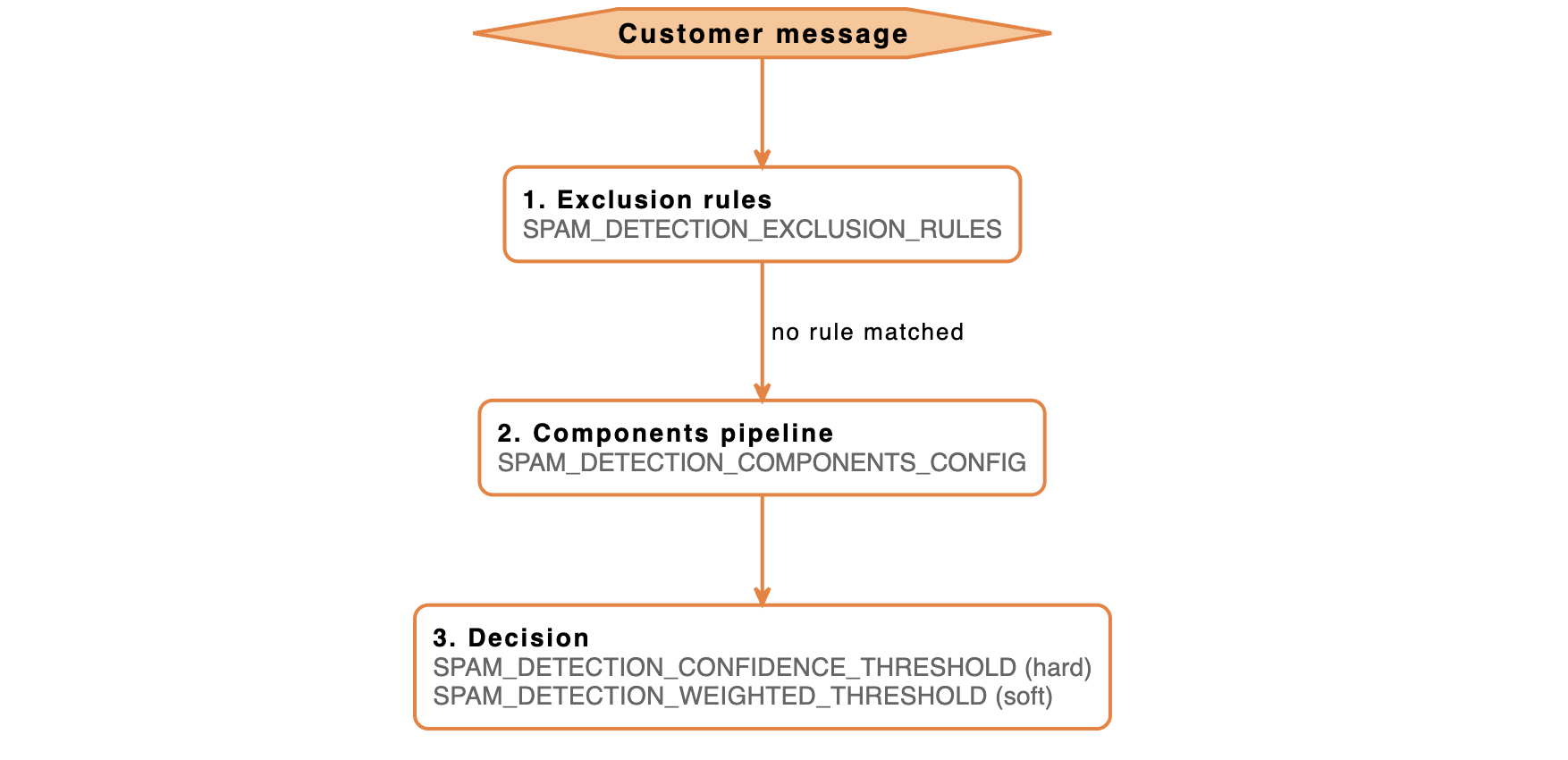
Configuration overview
Three levels of control, from simplest to most powerful:
- Basic setup — turn detection on and customize the message shown to blocked customers
- Tuning sensitivity — adjust how strict the detector is
- Advanced — replace the default exclusion rules or component pipeline
Basic setup
Two variables enable the system and define what blocked customers see:
| Variable | Description | Default |
|---|---|---|
SPAM_DETECTION_ENABLED | Master switch for spam detection on incoming messages. | False |
SPAM_DETECTION_MESSAGE | Response sent to the customer when a message is blocked as spam. | Your message was detected as spam and was not delivered. |
Set SPAM_DETECTION_ENABLED=true to start scoring messages with the default rules. All other SPAM_DETECTION_* variables — both in Tuning sensitivity and Advanced — only take effect when detection is enabled. If SPAM_DETECTION_ENABLED is false, every other spam variable is ignored
Tuning sensitivity
Adjust how strict the detector is when valid messages get blocked or spam is missed.
The detector blocks messages two ways:
- Immediately (hard threshold) — if a single message's confidence reaches
SPAM_DETECTION_CONFIDENCE_THRESHOLD, the detector blocks it immediately. - Over time (soft threshold) — otherwise the detector takes a weighted average of recent message scores (newer messages count more) and compares it against
SPAM_DETECTION_WEIGHTED_THRESHOLD. This check only starts running after the agent has received at leastSPAM_DETECTION_MIN_MESSAGES_FOR_DECISIONmessages, so short opening replies like Hi are not blocked.
Tune both paths with these variables:
| Variable | Description | Default |
|---|---|---|
SPAM_DETECTION_CONFIDENCE_THRESHOLD | Hard threshold (0–1) applied to the aggregate confidence after all components have scored the message. If the score reaches this value, the message is blocked immediately. Lower it to make detection stricter. | 0.5 |
SPAM_DETECTION_WEIGHTED_THRESHOLD | Soft threshold (0–1) for the weighted decision across message history. Lower it to block sooner when several borderline messages appear in a row. | 0.35 |
SPAM_DETECTION_HISTORY_SIZE | Number of recent messages kept for the weighted check. | 5 |
SPAM_DETECTION_MIN_MESSAGES_FOR_DECISION | Minimum messages in history before the soft threshold applies. | 3 |
SPAM_DETECTION_TIME_DECAY_FACTOR | Decay factor in (0, 1] applied to older messages. Smaller values (close to 0, but not 0 itself) make the agent forget older messages faster and focus on the most recent replies; values close to 1 give all messages in history nearly equal weight. | 0.9 |
SPAM_DETECTION_SOFT_DEBUG_MODE_FOR_DEFAULT | If true, the default broad_gibberish component writes an extra SOFT DEBUG line for every score it produces. The score still contributes to the aggregate confidence, so blocking is unaffected — see Soft debug mode for details. | False |
These two thresholds always make the final block decision, whether you keep the default detector or set a custom SPAM_DETECTION_COMPONENTS_CONFIG. Per-component fields in the Advanced section only change how each component scores a message — the env-level thresholds in the table above still decide whether the message is blocked.
When to adjust thresholds
- Too many valid messages are blocked — raise
SPAM_DETECTION_CONFIDENCE_THRESHOLDandSPAM_DETECTION_WEIGHTED_THRESHOLD. - Spam is not blocked — lower the same two thresholds.
- Short messages like Ok are blocked — raise
SPAM_DETECTION_MIN_MESSAGES_FOR_DECISION, or add ashort_messagerule toSPAM_DETECTION_EXCLUSION_RULES(see Advanced).
Quick presets to start from:
| Preset | When to use | Variables |
|---|---|---|
| Strict | Block more, tolerate some false positives. | SPAM_DETECTION_CONFIDENCE_THRESHOLD=0.4SPAM_DETECTION_WEIGHTED_THRESHOLD=0.3 |
| Lenient | Block only obvious spam. | SPAM_DETECTION_CONFIDENCE_THRESHOLD=0.7SPAM_DETECTION_WEIGHTED_THRESHOLD=0.5SPAM_DETECTION_MIN_MESSAGES_FOR_DECISION=5 |
Soft debug mode
Set SPAM_DETECTION_SOFT_DEBUG_MODE_FOR_DEFAULT=true to make the default broad_gibberish component write an extra SPAM DETECTOR | SOFT DEBUG | ... line for every score it produces. Use it to inspect the scores your real customer messages generate.
Soft debug mode does not prevent blocking. The component's score still contributes to the aggregate confidence, so messages can still reach the hard or soft threshold and be blocked. To test new thresholds without blocking real customers, raise SPAM_DETECTION_CONFIDENCE_THRESHOLD and SPAM_DETECTION_WEIGHTED_THRESHOLD to 1.0 first, observe the logged scores, then lower them to your target values.
Soft debug mode applies only to the default detector. If you set SPAM_DETECTION_COMPONENTS_CONFIG, this variable has no effect — set the per-component soft_debug_mode field instead, which behaves the same way (one extra log line for each scored message, no change to blocking).
Advanced: custom components and exclusion rules
Use the advanced configuration when the default rules don't fit the types of messages you receive. Common reasons include:
- You want specific kinds of messages (short replies, confirmation codes, emoji) to skip detection.
- You need a different mix of components — stricter, more lenient, or a new component that runs together with the default one.
- You want to test a new component in production without affecting customers (per-component
soft_debug_mode).
Override the detector pipeline and exclusion rules (advanced)
Use this section only if the default detector is not enough.
By default, the detector runs:
- one component:
broad_gibberish - one exclusion rule:
single_digit
You can replace either or both with custom JSON configurations.
SPAM_DETECTION_COMPONENTS_CONFIG
Defines the detection pipeline as a JSON array of components. Each component supports the following fields:
| Field | Required | Description |
|---|---|---|
name | yes | Component type. Supported: broad_gibberish, gibberish. |
enabled | no | If false, the component is skipped. Default true. |
weight | no | Multiplier applied to the component's score in the aggregate confidence. Default 1.0. |
threshold | no | Defines a score range and a mode that determine when the component marks the message as spam internally (see below). |
soft_debug_mode | no | If true, the component logs each scored message with a soft-debug marker but does not count itself as a spam contributor. Default false. |
params | no | Component-specific settings. Empty for the supported components. |
Threshold modes
A threshold defines a score range (lower_bound to upper_bound) and a mode that decides when the component marks the message as spam:
outside— mark the message when the score is outside the range. Example:[0.0, 0.3]marks any score above0.3. This is the most common setup.inside— mark the message when the score is inside the range. Use this when the spam signal matches a specific score band.
Example: default pipeline
This configuration matches the default behavior and is a good starting point:
[
  {
    "name": "broad_gibberish",
    "enabled": true,
    "weight": 1.0,
    "threshold": { "lower_bound": 0.0, "upper_bound": 0.3, "mode": "outside" },
    "soft_debug_mode": false
  }
]
Setting SPAM_DETECTION_COMPONENTS_CONFIG replaces the default pipeline. The default setup includes only broad_gibberish — to keep it, add it explicitly to your configuration (the example above does this).
SPAM_DETECTION_EXCLUSION_RULES
Defines rules that skip spam detection entirely. Exclusion rules run before the components pipeline — if a rule matches, no scoring component is executed for that message.
When a rule matches:
- the message is treated as not spam (
confidence = 0.0) - no scoring components are executed
- the result is logged with
excluded_by_rule=<name>
Use exclusion rules for messages that are hard to score reliably, such as:
- short replies (
ok,yes) - single digits (
5) - emojis
Each rule supports the following fields:
| Field | Required | Description |
|---|---|---|
name | yes | Free-form label used in logs. |
rule_type | yes | Rule type (see below). |
enabled | no | Default true. Set to false to keep the rule in config but disable it. |
params | no | Rule-specific parameters. |
Supported rule types
rule_type | What it matches | Parameters | Examples |
|---|---|---|---|
single_digit | A message that is a single digit (0–9) after trimming whitespace. | none | matches: 5, 0, 7does not match: 55, 5a, a |
short_message | A message with length ≤ max_length after trimming whitespace. | max_length (default 2) | matches: ok, да, 5does not match: yes, okay |
When to use:
- Use
single_digitfor menu selections or confirmation codes. - Use
short_messagefor chats with frequent short replies.
Setting SPAM_DETECTION_EXCLUSION_RULES replaces the default rules. The default setup includes only single_digit — to keep it, add it explicitly to your configuration.
The example below keeps the default single_digit behavior and adds short_message with a slightly higher limit of 3:
[
  {"name": "single_digit_exclusion", "rule_type": "single_digit", "enabled": true},
  {"name": "short_msg_exclusion", "rule_type": "short_message", "enabled": true, "params": {"max_length": 3}}
]
With this setup:
- single digits and short messages (≤ 3 chars) skip detection
- all other messages go through the components pipeline
Putting it all together
A typical custom configuration uses all three stages of the pipeline — exclusion rules, components, and decision. The example below follows the Strict preset (thresholds 0.4 / 0.3), lets short customer replies skip detection through exclusion rules, and runs the default broad_gibberish component:
SPAM_DETECTION_ENABLED=true
SPAM_DETECTION_MESSAGE="Sorry, I couldn't understand your message. Could you rephrase it?"
SPAM_DETECTION_CONFIDENCE_THRESHOLD=0.4
SPAM_DETECTION_WEIGHTED_THRESHOLD=0.3

SPAM_DETECTION_EXCLUSION_RULES='[
  { "name": "single_digit_exclusion", "rule_type": "single_digit", "enabled": true },
  { "name": "short_msg_exclusion", "rule_type": "short_message", "enabled": true, "params": { "max_length": 3 } }
]'

SPAM_DETECTION_COMPONENTS_CONFIG='[
  {
    "name": "broad_gibberish",
    "enabled": true,
    "weight": 1.0,
    "threshold": { "lower_bound": 0.0, "upper_bound": 0.3, "mode": "outside" },
    "soft_debug_mode": false
  }
]'
All other SPAM_DETECTION_* variables (thresholds, history size, decay factor) still apply when using custom components, as described in the Tuning sensitivity section.