Test in the Playground panel
Part of the classic, legacy agent editor. Agents created today use Configure an agent instead — see Simple mode for details.
The Playground panel sits on the right side of the agent page in Simple mode. Use it to chat with your agent exactly as a customer would — check the tone, the answers, and the data it collects — without connecting any channel. For testing any agent on a full page, see Playground.
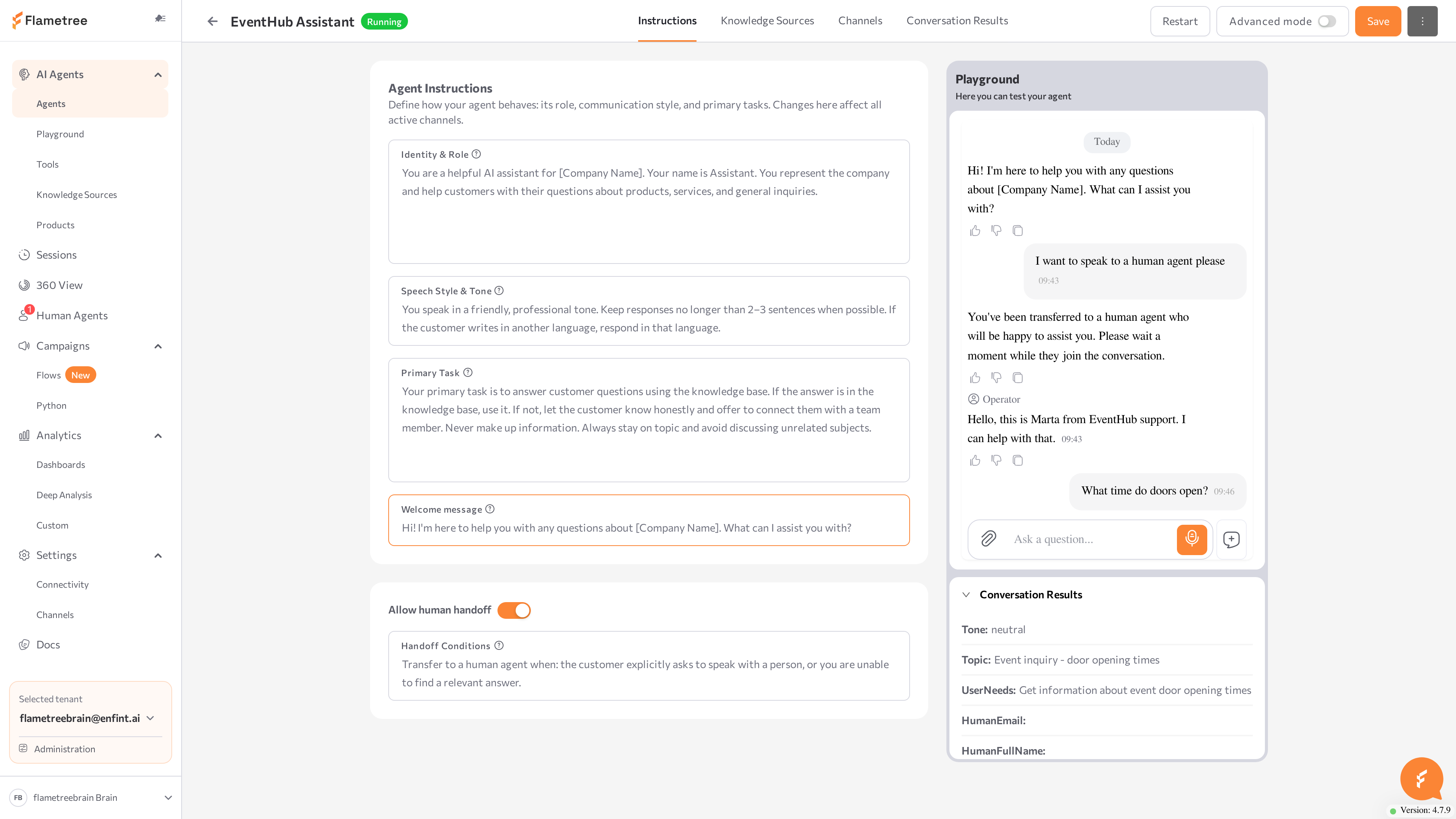
Start a test session
- Configure the agent tabs (at minimum, the Instructions tab).
- Click Save. The agent starts (or restarts) and the panel opens a fresh chat session.
- Type a message in the chat and check the reply.
The panel tells you when the agent isn't ready to chat:
| Panel state | What it means | What to do |
|---|---|---|
| "Save your agent to chat with it" | The agent has never been saved. | Click Save. |
| "Agent is not running. Start the agent to test it in the playground." | The agent is stopped. | Click Run agent. |
| "Please wait until the agent is started/created/stopped" | The agent is changing state. | Wait a few seconds. |
| "Unsaved changes. Save to apply — this will update the live agent on all channels." | You edited the configuration. | Click Save changes to test the new version. |
| "Agent has an error..." | The agent failed to start. | Open the agent configuration and fix the reported errors. |
Check answers and collected results
Test against what you configured:
- Instructions — does the agent introduce itself correctly, keep the right tone, stay on task, and open with your welcome message?
- Knowledge Sources — ask questions your sources should answer, and at least one question they should not, to see how the agent handles unknowns.
- Human handoff — trigger your handoff conditions and confirm the agent offers to transfer.
- Conversation Results — the block under the chat shows "No results yet" until the agent recognizes data. Mention a name, an email, or one of your custom-field values and watch the block fill in live.
Retest after saving changes
When you change any tab, the panel dims with the Unsaved changes overlay — the chat still runs the previously saved version. Click Save changes: the agent restarts automatically and the panel starts a new test session, so every test runs against the saved configuration.
Saving updates the live agent on all connected channels, not only the Playground.
Related pages
- Simple mode overview
- Playground — full-page playground for testing any agent
- Conversation results